Move your private photos out of your camera roll
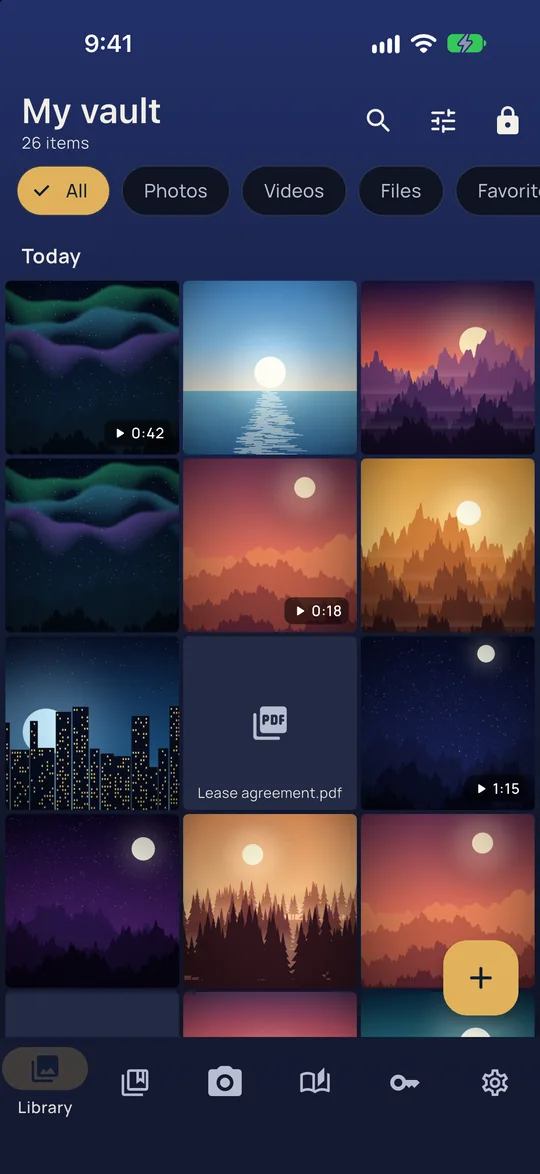
Vaultan is a photo vault that keeps your pictures encrypted on your phone. Import them, remove the originals in one step, and open the vault only by drawing your pattern.
Our promises
- Free to download and use. The app has free-plan limits and an optional Pro upgrade.
- No account. We never ask for your email address, even if you upgrade to Pro, because Apple or Google handles the purchase.
- No email lists and no newsletters. The app has no ads, no analytics and no tracking; this website counts visits anonymously, with no cookies.
The only time we see your email address is if you choose to email [email protected].
What you get
Import, then remove the originals
Pick photos from your library and move them into the vault. Once they are safely stored, Vaultan can remove the originals from your camera roll in one step.
A camera that skips the camera roll
Photos taken with the built-in camera go straight into the vault. They never appear in your camera roll or your cloud photo library.
Albums that stay organized
Albums and sub-albums, favorites, search and a library sorted by date, with a full-screen viewer you can zoom and swipe through.
Encrypted down to the album names
Every photo, thumbnail and album name is encrypted with AES-256. Your pattern is never stored. It is turned into the key on your phone each time you draw it.
Why the camera roll is a poor place for private photos
Anything in your camera roll can turn up where you did not expect it: in the picker when you attach something to a message, on a screen you hand to a friend, in a cloud library that syncs by itself. A photo vault keeps the private ones somewhere else entirely.
In Vaultan the photos are encrypted files inside the app, and the vault opens only when you draw your pattern on the puzzle game. There is no password to forget and no account to lose.
Good to know
The free plan holds 2 vaults with up to 100 photos in each, and Vaultan Pro removes those limits. Your photos leave the phone only as an encrypted backup copy in your own iCloud or Google Drive, which you can switch off for any vault.
Try it in your browser first
Before you send a photo to anyone, you can see what is hidden inside it, such as the place it was taken, and remove it, right in your browser.
Questions
Does Vaultan upload my photos?
No. Photos are encrypted on your phone. The only copy that ever leaves is the encrypted backup to your own iCloud or Google Drive, which Apple, Google and we cannot open.
What happens to the originals in my camera roll?
Vaultan can remove them for you once the photos are stored in the vault. Check that they are in the vault before you confirm.
Can I get my photos back on a new phone?
Yes. Install Vaultan, choose Restore from cloud backup and draw your pattern. If you use a backup file instead, you need the passphrase you chose for it.
More about this in the app
Private camera
Photos and videos go straight into the vault, never the camera roll.
Pattern lock
Draw your pattern to open your vault. No account, no password to forget.
Sultan's Treasury, the game
A real jewel puzzle game with 60 levels. Your pattern, drawn on its board, opens the vault.
Give your private photos a vault of their own
Vaultan keeps your photos encrypted on your phone and opens only to your pattern, with no account to create.
Vaultan for other jobs
Private video vault
Record or import videos into an encrypted vault, out of your gallery.
Offline password manager
Logins, cards and secure notes in an encrypted vault with no account.
2FA authenticator
Six-digit sign-in codes that work offline and can be backed up.
Private document scanner
Scan pages to PDF, straightened and saved in an encrypted vault.
PDF tools: redact, sign, merge
Black out, sign, join and rearrange PDFs on your phone without uploading them.
Photo editor and face blur
Blur every face with one tap, soften backgrounds, crop and adjust on your phone.
Private journal
A diary only your pattern opens, with daily prompts, moods and streaks.
Decoy vaults and emergency erase
Give each vault its own pattern, and set a pattern that erases the others.
Encrypted backup and sync
Automatic encrypted backup to your own iCloud or Google Drive, and sync with Pro.