Separate vaults, and a pattern that erases the rest
Give every vault its own pattern. Keep a decoy vault for everyday things, and set an emergency erase pattern for the moments when you are being pushed to unlock your phone.
Our promises
- Free to download and use. The app has free-plan limits and an optional Pro upgrade.
- No account. We never ask for your email address, even if you upgrade to Pro, because Apple or Google handles the purchase.
- No email lists and no newsletters. The app has no ads, no analytics and no tracking; this website counts visits anonymously, with no cookies.
The only time we see your email address is if you choose to email [email protected].
What you get
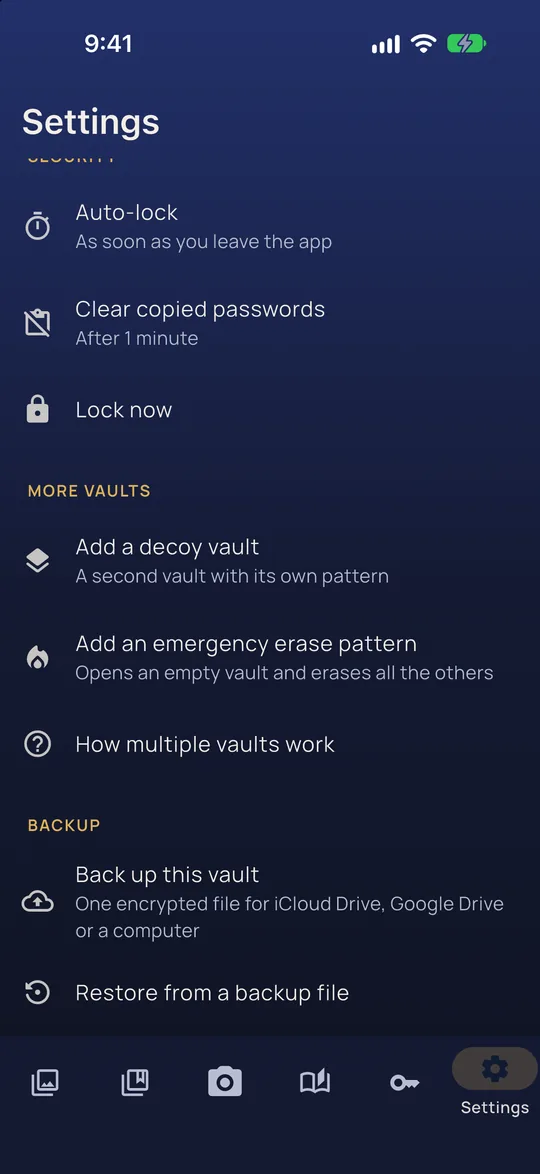
A decoy vault
A second vault with its own pattern, for when someone insists that you open the app. Keep everyday things in it and the rest in your main vault.
Emergency erase
A separate pattern that opens an empty vault and permanently erases every other vault on the phone. The app explains exactly what will happen before you turn it on.
No list, no counter
The app has no vault list and no vault counter, so the screen never tells anyone how many vaults you have.
A way back
Each vault has a recovery phrase. If you keep an encrypted backup file somewhere else, you can restore an erased vault from it later.
Sometimes you cannot simply say no
There are moments when declining to unlock your phone is not an option you can afford. Vaultan gives you a different choice: which pattern you draw.
Every vault has its own pattern and its own encryption key. Nothing on screen lists the other vaults, and nothing inside one vault mentions another.
Good to know
We are plain about the limits. Vaultan is listed under its own name, and the game screen means a quick glance shows a game, not that the app is invisible. It cannot protect you from someone who watches you draw your pattern, and someone who can examine the app's storage with forensic tools may be able to estimate how many vaults exist, although they cannot read them. Erased vaults cannot be recovered from the device.
Questions
What does emergency erase do?
Drawing the emergency erase pattern opens a new, empty vault and permanently erases every other vault on the phone.
Can an erased vault be recovered?
Not from the device. If you keep an encrypted backup file somewhere else, you can restore from it later with your recovery phrase or backup passphrase.
Do I need Pro for a decoy vault?
The free plan has room for two vaults, so a decoy vault is included. Emergency erase is part of Vaultan Pro.
More about this in the app
Separate and decoy vaults
Each pattern opens its own vault. Nothing on screen lists the others.
Emergency erase
A pattern that opens an empty vault and permanently erases the others.
Pattern lock
Draw your pattern to open your vault. No account, no password to forget.
Decide which vault opens
Separate vaults with their own patterns, and an emergency erase pattern you hope never to use, on your phone and with no account.
Vaultan for other jobs
Private photo vault
Move private photos out of your camera roll into an encrypted vault.
Private video vault
Record or import videos into an encrypted vault, out of your gallery.
Offline password manager
Logins, cards and secure notes in an encrypted vault with no account.
2FA authenticator
Six-digit sign-in codes that work offline and can be backed up.
Private document scanner
Scan pages to PDF, straightened and saved in an encrypted vault.
PDF tools: redact, sign, merge
Black out, sign, join and rearrange PDFs on your phone without uploading them.
Photo editor and face blur
Blur every face with one tap, soften backgrounds, crop and adjust on your phone.
Private journal
A diary only your pattern opens, with daily prompts, moods and streaks.
Encrypted backup and sync
Automatic encrypted backup to your own iCloud or Google Drive, and sync with Pro.