Vaultan

Home › Features › Password manager

Password manager

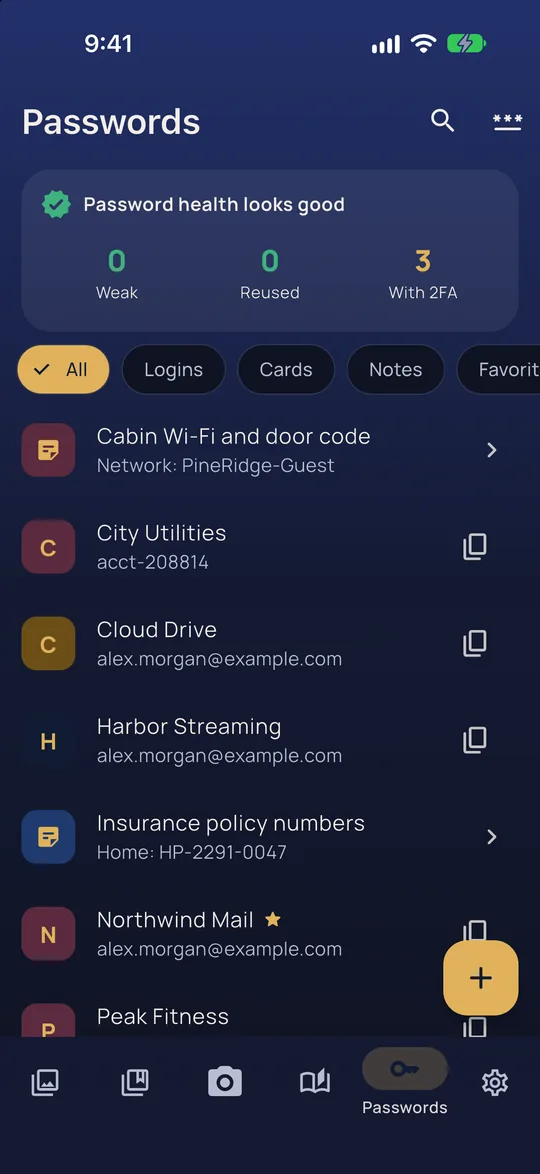
The password list with logins, cards, secure notes and a password health summary

Logins, cards and secure notes, with a generator, kept offline in your vault.

Vaultan includes a full password manager, kept in the same encrypted vault as your photos. Save logins, payment cards and secure notes, search them, and copy a password with one tap. The clipboard is cleared automatically a short time later.

The built-in generator makes random passwords or memorable passphrases to the length you choose, and each login keeps a history of its previous passwords in case you need an old one.

It works with no internet at all. There is no master account to breach and nothing on our servers to leak. If you turn on cloud backup, your passwords travel inside the same encrypted vault copy as everything else, to your own iCloud or Google Drive, unreadable to anyone but you.

How it compares

More in Vaultan

Sultan's Treasury, the game

A real jewel puzzle game with 60 levels. Your pattern, drawn on its board, opens the vault.

Pattern lock

Draw your pattern to open your vault. No account, no password to forget.

Separate and decoy vaults

Each pattern opens its own vault. Nothing on screen lists the others.

Emergency erase

A pattern that opens an empty vault and permanently erases the others.

Private camera

Photos and videos go straight into the vault, never the camera roll.

Backup files

One encrypted file holding a whole vault. Keep it anywhere, or use it to move between iPhone and Android.

Secure sharing

Send an encrypted file that opens only with the passphrase you give.

Choose your app icon

Six icon designs to pick from. The name under it always stays Vaultan.

Encrypted cloud backup and sync

Automatic encrypted backup to your own iCloud or Google Drive, and the same vault on all your devices.

Document scanner

Scan pages to a PDF that is encrypted on your phone. It finds the page, straightens it and takes the shot for you.

PDF editor

Reorder, rotate, remove, add, join, redact and sign PDF pages, all inside your encrypted vault.

Private photo editor

Crop, straighten, adjust and blur photos inside your vault. The original is never changed.

2FA authenticator

Six-digit sign-in codes for your accounts, stored with the login they belong to.

Private journal

A diary only your pattern can open, with prompts, moods and streaks.

Redact a PDF

Hide names, numbers and addresses for good, with a black box or by erasing them into the page.

Sign a PDF

Draw your signature, drag it into place and save the signed copy, without uploading the document.

Merge PDFs and add pages

Join PDFs into one, or scan extra pages straight onto the end of a document.

Blur faces in photos

One tap finds every face and blurs it, on your phone. Nothing is uploaded.

Blur a photo background

Keep the person sharp and soften everything behind them, like a portrait photo.

Remove photo location and metadata

Strip GPS location and camera details from your photos, in the vault and whenever you export.